Song library, chords and setlists
Every song your church sings in one place, with lyrics, chords, key and BPM. You build Sunday’s setlist, attach it to the shift, and whoever is playing finds it ready — with the chords in the key they need, on screen or printed.
You have the songs. The problem is where they are.
A PDF posted to the group two years ago, a printed sheet somebody has in their bag, a key only the guitarist remembers. And the question nobody can answer: when did we last sing this one? Church Pilot keeps the library, the setlists and the history in the same place, inside the WordPress you already run.
Your repertoire, written down once
Each song carries a title, an author, a key, BPM, a link (video or backing track) and the lyrics with chords. You write it once, and every setlist pulls from there.
- Paste the chord sheet as it is. The lyrics field is deliberately plain: whatever you copy from a chord site or from Word arrives intact, with the spacing where it belongs. Asterisks and underscores are enough for bold and italic.
- Instant search as you type, with a result count: with two hundred songs in the library it’s the only way to find one.
- Two columns tell you what you actually need to know: how many times a song has been used and when it was last sung.
- If you ever delete a song, past setlists keep the title — it stays written, as a free entry.
The setlist belongs to the shift, not to a file
You build the setlist and attach it to the event. From that moment everyone serving that Sunday finds it on their own page — nobody has to send anything to anyone.
- A designated worship leader for the event, picked from a search field that puts the people already on that shift at the top. They see it, and so do the others in their group.
- Every song carries its key (suggested from the library, though a key you type yourself always wins), the moment — opening, worship, communion — and a note for the musicians: “start a cappella”, “chorus ×2”.
- A song that isn’t in the library you just type in, without having to file it first.
- Reorder by dragging. A setlist that worked can be duplicated and tweaked instead of rebuilt.
Chords in the right key, without rewriting anything
The musician opens the setlist and finds the songs in order, each with key, BPM and moment. Too high for the singer? They move it up or down a semitone at a time and the chords rewrite themselves.
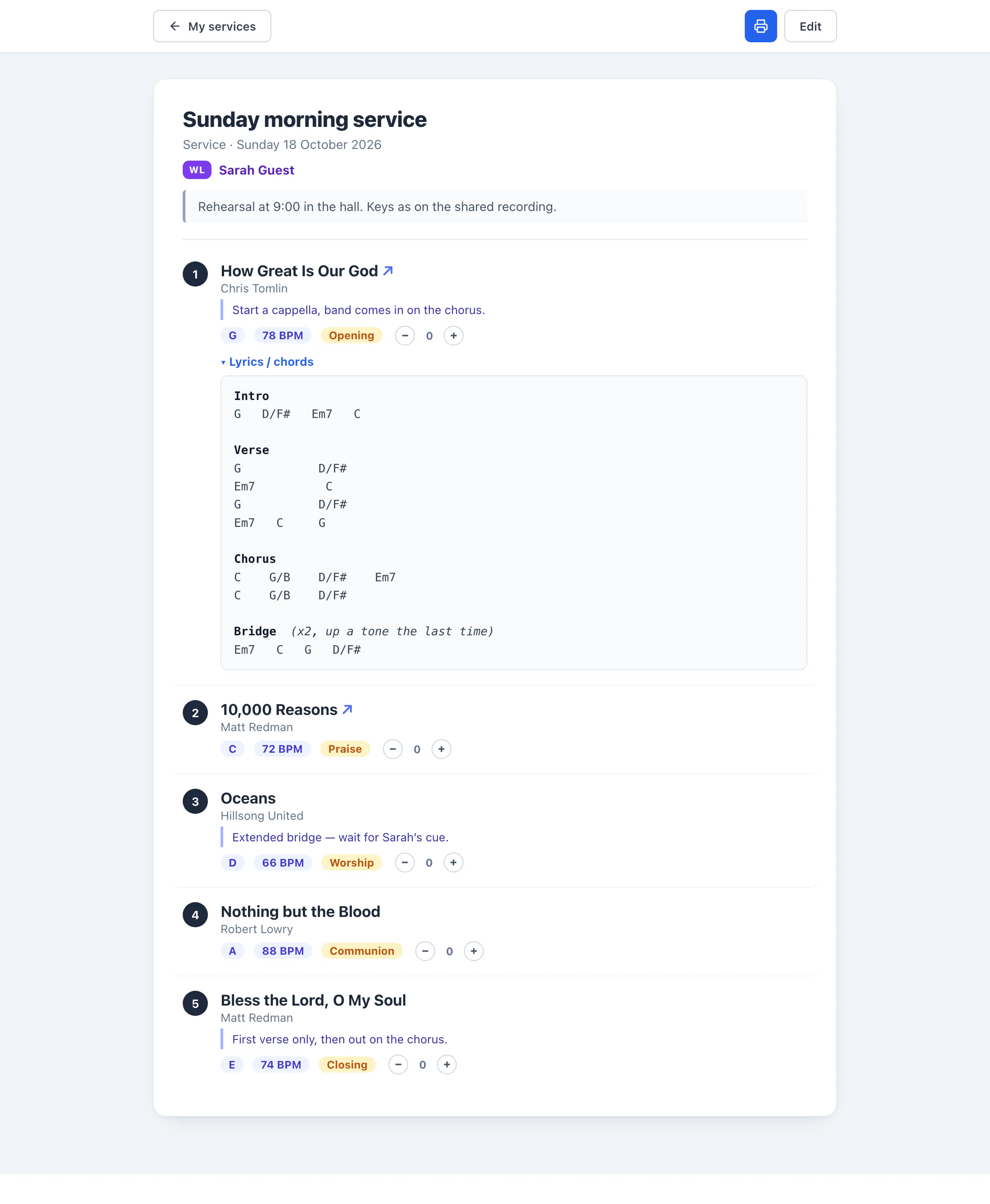
Swipe the image to see it all.
- Transposing recognises the chord lines and leaves the sung words alone, so a lyric never gets mistaken for a chord.
- It keeps the notation you used — C-D-E or Do-Re-Mi — song by song, slash basses included (G/B).
- It prints. The sheet comes out with the chords already transposed and the lyrics expanded, without the on-screen controls — for whoever wants paper on the piano.
Not the same song three Sundays running
It’s the real risk when you plan worship, and you always notice too late. As you pick a song, Church Pilot tells you straight away: “Used 3 weeks ago”, “Already scheduled for 9 August”, “Never used before”.
- The warning turns amber if the song is already scheduled further out or you used it less than a month ago. Between past and future the future wins: it’s the only one you can still avoid.
- A Statistics tab shows the most-used songs, the ones never sung, and how many out of how many, with a period filter.
- Only what was actually sung counts: setlists attached to a shift. Rehearsals and working copies don’t skew the numbers.
The setlist is for the people serving, not the whole church
Each setlist is visible to whoever is on that shift, and you can narrow it further by role or by group — the worship team only, say. With no restriction everyone on the shift sees it; the designated worship leader always does.
- Someone in the worship group sees it even if that Sunday they serve in a different role: what counts is belonging, not the slot they filled that day.
- You can hand the library and the setlists to a volunteer without making them a site administrator: they see songs and setlists, and nothing else.
The screenshots on this page show sample data: names, contact details, phone numbers and figures are entirely fictional and shown for illustration. Any resemblance to real people is coincidental.
Try it on next Sunday
A thirty-day trial on the Starter plan, which includes the library and setlists, scheduling, attendance confirmations and email broadcasts.